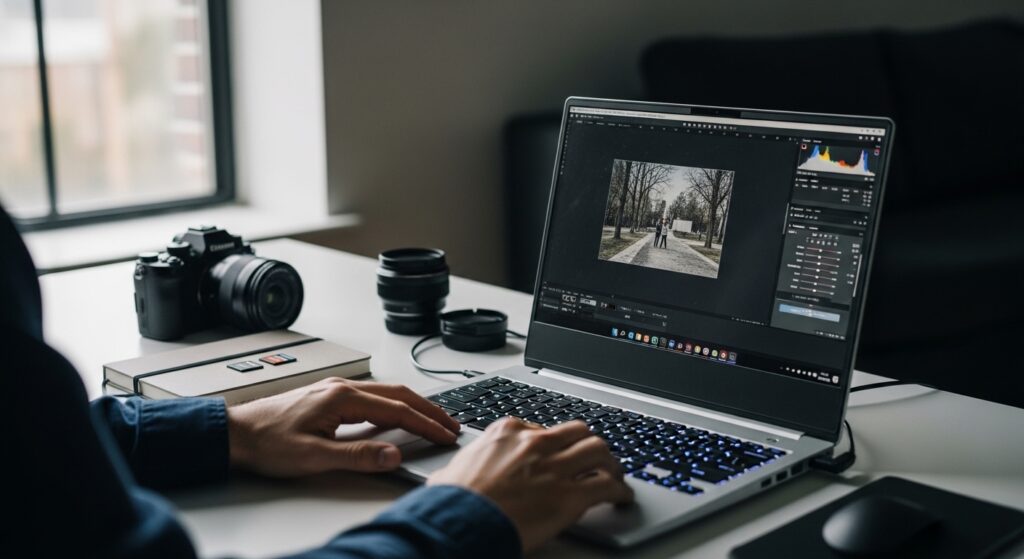
In 2026, AI-powered editing tools are increasing GPU usage in photo software. Gaming laptops are becoming more viable for photographers – but display color accuracy remains the deciding factor. OLED gaming displays with 100% DCI-P3 are closing the gap between gaming and creator laptops.
Can a gaming laptop handle professional photo editing? Many people ask this question when shopping for powerful computers.
Gaming laptops pack serious performance with fast processors, lots of memory, and dedicated graphics cards. These specs sound perfect for photo editing. But there’s an important catch: display quality matters just as much as raw power for editing work.
This guide examines whether gaming laptops suit photo editing needs. You’ll learn how gaming hardware performs for editing tasks, where it excels, and the critical limitation you must consider. We’ll explore processors, memory, displays, and real-world performance to help you understand if a gaming laptop meets your editing requirements.
Table of Contents
Understanding Gaming Laptops and Photo Editing Requirements
Gaming laptops are portable computers designed primarily for running demanding video games. They prioritize high performance, dedicated graphics cards, and fast refresh rate displays for smooth gaming experiences.
Photo editing requires different priorities. Opening large RAW files needs substantial memory. Applying adjustments demands good processor speed. Most importantly, accurate color representation is essential for professional editing work.
What Makes Gaming Laptops Different
Gaming laptops include powerful components that exceed typical productivity computers:
- High-performance processors: Intel Core i7/i9 or AMD Ryzen 7/9 CPUs
- Dedicated graphics cards: NVIDIA GeForce RTX or AMD Radeon GPUs
- Substantial RAM: Typically 16GB to 32GB as standard
- Fast storage: NVMe SSD drives for quick data access
- Robust cooling: Multiple fans and heat pipes for sustained performance
These specs create overlap with photo editing requirements. Both gaming and editing benefit from fast processors, ample memory, and quick storage.
The Critical Difference: Display Priorities
Here’s where gaming laptops and photo editing computers diverge:
Gaming displays prioritize:
- High refresh rates (120Hz, 144Hz, 240Hz+)
- Fast response times for smooth motion
- Brightness for visibility during gameplay
Photo editing displays require:
- Color accuracy for precise editing decisions
- Wide color gamut coverage (100% sRGB minimum)
- Factory calibration for consistent results
Many gaming displays sacrifice color accuracy to achieve high refresh rates. This creates the main challenge when using gaming laptops for photo editing.
How Gaming Laptop Components Support Photo Editing
Understanding how each component works during editing reveals gaming laptop strengths and weaknesses.
Processor Performance: Gaming Laptops Excel Here
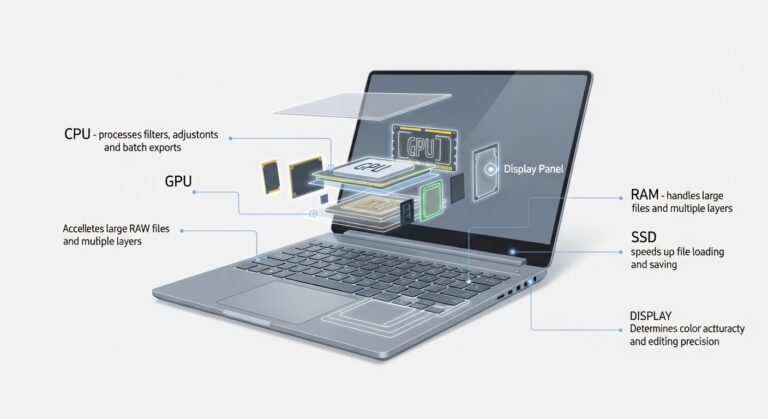
Gaming laptops include powerful CPUs that handle photo editing extremely well. Modern processors like Intel’s Core Ultra series and AMD’s Ryzen chips deliver excellent editing performance.
CPU tasks during photo editing:
- Applying filters and adjustments
- Processing layer calculations
- Managing batch operations
- Handling multiple open files
Gaming laptop processors typically exceed photo editing requirements. You’ll experience smooth, responsive editing even with large RAW files.
Graphics Power: Often More Than Needed
Gaming laptops feature dedicated GPUs like NVIDIA’s RTX 5000 series or AMD Radeon cards. These provide substantial graphics processing power.
How GPUs help photo editing:
- Accelerate specific software features
- Speed up AI-powered tools (denoising, generative fill)
- Improve preview rendering
- Support high-resolution displays
Modern photo editing software increasingly uses GPU acceleration. Adobe Photoshop leverages GPUs for neural filters and effects. Lightroom uses GPU power for faster previews.
However, gaming laptop GPUs often provide more power than photo editing requires. This creates value for users who also game or edit videos, but represents over-specification for photography-only work.
Memory Capacity: Perfect Match
Most gaming laptops include 16GB to 32GB of RAM as standard. This aligns perfectly with photo editing requirements.
Editing Level | RAM Needed | Gaming Laptop Standard |
Basic editing | 16GB | ✓ Typically included |
Professional RAW work | 32GB | ✓ Often available |
Heavy AI features | 64GB | △ Available in high-end models |
Gaming laptop memory specifications meet or exceed photo editing needs for most users.
Storage Speed: Another Gaming Laptop Strength
Fast NVMe SSD storage in gaming laptops benefits photo editing workflows significantly:
- Quick file opening and saving
- Faster application launches
- Improved browsing through photo libraries
- Reduced export times
Gaming laptops typically include 512GB to 2TB of SSD storage. This provides good working space, though photographers may still need external drives for large image libraries.
The Display Challenge: Gaming vs. Photo Editing Needs
Display quality represents the most important consideration when using gaming laptops for photo editing.
Why Color Accuracy Matters
When you edit photos, what you see on screen must match how images look when exported or printed. Poor color accuracy creates serious problems:
- Colors appear different on other devices
- Print results don’t match your edits
- Client dissatisfaction with delivered work
- Wasted time re-editing images
Professional photographers require displays that cover at least 100% of the sRGB color space. Many prefer Adobe RGB coverage for print work.
Gaming Display Limitations
Many gaming displays prioritize features that don’t benefit photo editing:
Typical gaming display characteristics:
- High refresh rates (120Hz-240Hz) – unnecessary for static images
- Fast response times – irrelevant for photo work
- Limited color gamut coverage (60-80% sRGB in budget models)
- No factory color calibration
Industry reviews confirm these limitations. Testing shows many gaming laptops lack the color accuracy needed for professional photo editing.
Gaming Laptops With Accurate Displays
Not all gaming laptops have poor color accuracy. Some models specifically include displays suitable for creative work:
What to look for:
- 100% sRGB coverage (minimum for photo editing)
- Adobe RGB or DCI-P3 support (for professional work)
- Factory calibration (verified color accuracy)
- OLED panels (excellent color and contrast)
Recent gaming laptop models with color-accurate displays include OLED options from ASUS, Razer, and MSI. These combine gaming performance with professional-grade color accuracy.
The key is checking specifications carefully. Marketing materials may emphasize refresh rates while downplaying color accuracy.
External Monitor Solution
Many photographers using gaming laptops connect external color-accurate monitors for editing work. This approach:
- Provides reliable color accuracy
- Offers larger workspace
- Costs extra but solves display limitations
- Reduces portability for mobile editing
Real-World Photo Editing Performance
Understanding how gaming laptops perform during actual editing workflows helps evaluate their suitability.
Importing Photos
Gaming laptop storage speed handles photo imports efficiently. Fast NVMe SSDs transfer files quickly from camera cards or external drives.
However, gaming laptops often lack built-in SD card readers—a feature common in creator-focused laptops. External card readers solve this but add another item to carry.
Active Editing Work
During actual editing, gaming laptops perform excellently:
Performance during editing:
- Instant responsiveness when adjusting sliders
- Smooth handling of multiple layers
- Quick application of filters and effects
- No lag when zooming into images
The powerful processors and ample RAM create a smooth editing experience. Modern gaming laptops handle professional editing software without slowdowns.
Batch Processing and Export
Gaming laptop multi-core processors excel at batch operations. Exporting hundreds of edited photos happens quickly compared to standard productivity laptops.
GPU acceleration speeds certain export processes when software supports it. Overall export performance matches or exceeds creator-focused laptops.
Who Should Consider Gaming Laptops for Photo Editing
Gaming laptops suit specific user profiles while creating challenges for others.
Ideal for Multi-Purpose Users
Gaming laptops make excellent sense for people who need one powerful device for multiple intensive tasks:
Benefits for multi-purpose use:
- Single device for gaming and editing
- Cost-effective compared to buying multiple computers
- Powerful enough for diverse workloads
- Good performance across different applications
Students balancing coursework, creative projects, and entertainment benefit from gaming laptop versatility. Professionals who edit photos and play games find one device more practical than separate systems.
Suitable for Hobbyist Photographers
Hobby photographers can work successfully with gaming laptops if they:
- Primarily share images online (less color-critical)
- Don’t require print-perfect color accuracy
- Value device versatility
- Can use external monitors when needed
For learning photo editing and developing skills, gaming laptop performance provides excellent responsiveness without professional display requirements.
Challenging for Professional Photographers
Professional photographers face significant challenges with gaming laptops:
Professional concerns:
- Client work demands accurate color delivery
- Print projects require precise color matching
- Professional reputation depends on consistent results
- Gaming aesthetics may not suit client meetings
Professional photographers typically need color-accurate displays as standard, making creator-focused laptops more appropriate despite higher costs.
Trade-offs and Limitations
Understanding gaming laptop drawbacks helps make informed decisions.
Portability Considerations
Gaming laptops typically weigh 4-7 pounds—heavier than ultraportable creator laptops at 3-4 pounds. Thicker chassis accommodate cooling systems.
Battery life usually lasts 3-5 hours during photo editing. Creator-focused laptops often deliver 8-12 hours.
These factors reduce convenience for mobile editing or location photography work.
Noise and Heat
Gaming laptop cooling systems can become noticeable during intensive editing:
- Fan noise may distract during concentration
- Warm surfaces affect lap use comfort
- Louder operation than compact alternatives
While cooling systems prevent performance throttling, acoustic considerations matter for quiet work environments.
Paying for Gaming Features
Gaming laptop prices reflect features that don’t benefit photo editing:
- High refresh rate displays (no value for static images)
- Extreme GPU power (beyond editing requirements)
- Gaming-focused aesthetics and RGB lighting
- Specialized gaming software and features
Creator laptops may offer better value when purchasing purely for photo editing work.
Comparing Gaming Laptops to Alternatives
Understanding how gaming laptops compare to other options clarifies when they make sense.
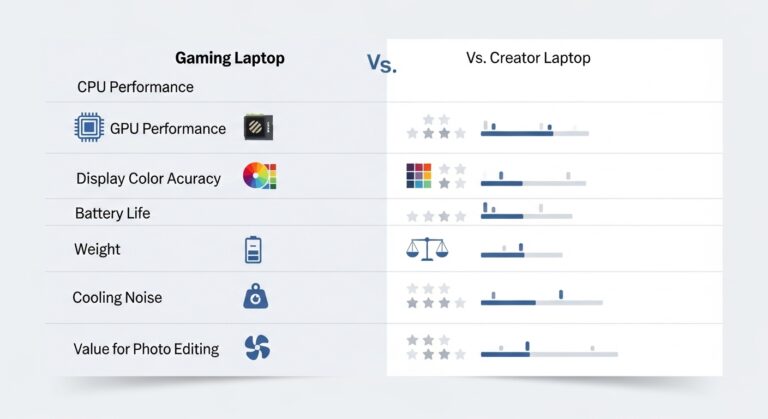
Gaming vs. Creator-Focused Laptops
Creator-focused laptops like MacBook Pros, Dell XPS, and ASUS ProArt models prioritize creative work.
Feature | Gaming Laptops | Creator Laptops |
CPU Performance | Excellent | Excellent |
GPU Power | Very High | Adequate |
Display Color Accuracy | Variable (check specs) | Excellent |
Battery Life | 3-5 hours | 8-12 hours |
Weight | 4-7 pounds | 3-4 pounds |
Price for Performance | Good value | Premium pricing |
Multi-purpose Use | Gaming + editing | Primarily creative work |
When gaming laptops win: Multi-purpose users who game and edit, those valuing raw performance, users with external monitors.
When creator laptops win: Professional photographers, mobile editing requirements, color-critical workflows.Understanding how gaming laptops compare to other options clarifies when they make sense.
Gaming Laptops vs. Standard Productivity Computers
Standard productivity laptops struggle with professional photo editing demands. Gaming laptops provide massive performance advantages for editing work compared to typical business laptops.
If photo editing is your primary intensive task, gaming laptops deliver much better value than upgrading standard productivity computers.
Making the Right Choice
Several factors determine whether gaming laptops suit your photo editing needs.
Check Display Specifications Carefully
If considering a gaming laptop for photo editing, verify:
- Color gamut coverage percentage
- Factory calibration status
- Panel type (IPS or OLED preferred)
- Professional reviews mentioning color accuracy
Don’t assume all gaming laptops have poor displays. Research specific models to find those with verified color accuracy.
Consider Your Actual Editing Needs
Match laptop choice to your real requirements:
Gaming laptops work well if you:
- Edit as a hobby or learning skill
- Share images primarily online
- Need one device for multiple intensive tasks
- Have or plan external monitors for color work
Choose creator-focused laptops if you:
- Work professionally with clients
- Produce images for print
- Require mobile color-accurate editing
- Prioritize battery life and portability
Future-Proofing Considerations
Gaming laptop performance provides headroom for future software demands. AI-powered editing features increasingly benefit from powerful GPUs.
However, display limitations persist throughout the laptop’s lifespan. If color accuracy matters now, it will continue mattering years later.
Final Thoughts on Gaming Laptops for Photo Editing
Gaming laptops provide powerful hardware well-suited to photo editing performance demands. Fast processors, substantial RAM, dedicated graphics cards, and quick SSD storage create smooth, responsive editing experiences. Performance-wise, gaming laptops excel at handling large RAW files, applying effects, and batch processing images.
The suitability of gaming laptops for photo editing depends primarily on display considerations. While gaming laptop components perform excellently for editing tasks, many gaming displays lack the color accuracy essential for professional photo work. Users must specifically select models with verified color accuracy specifications or plan external monitor solutions.
Additional trade-offs include reduced portability due to weight and size, shorter battery life compared to efficiency-focused alternatives, and potential distractions from cooling fan noise. These factors matter less for stationary editing setups but affect mobile photography workflows significantly.
Gaming laptops represent excellent value for multi-purpose users who need powerful devices for both gaming and photo editing. The ability to handle diverse intensive tasks with a single computer justifies the investment despite display limitations that external monitors can address.
For users exclusively focused on photo editing-particularly professional photographers requiring consistent color accuracy-creator-focused laptops may provide better feature alignment despite potentially higher costs for equivalent performance. The color-accurate displays, longer battery life, and professional aesthetics of creator laptops directly address photography workflow priorities.
Educational takeaway: Gaming laptops deliver strong photo editing performance, but display color accuracy requires careful verification. Success depends on matching hardware capabilities to your specific editing requirements, working style, and whether the device serves multiple purposes.
Frequently Asked Questions
Yes, gaming laptops provide excellent performance for photo editing. They include high-end processors (Intel Core i7/i9, AMD Ryzen 7/9), 16-32GB RAM, and dedicated GPUs that exceed most photo editing requirements. Gaming laptops handle large RAW files, complex layers, and batch processing smoothly.
This varies by model. Many gaming displays prioritize high refresh rates over color accuracy, creating problems for professional editing. However, some gaming laptops include OLED displays with 100% DCI-P3 color coverage and factory calibration. Always check specific display specifications before purchasing for photo editing work.
Gaming laptops significantly outperform standard productivity laptops for photo editing due to faster processors, more RAM, dedicated GPUs, and better storage. However, creator-focused laptops designed specifically for photo editing may offer better displays and battery life despite similar performance levels.
Professional photo editing on gaming laptops is possible but requires careful model selection. Choose gaming laptops with color-accurate displays (100% sRGB minimum) or plan to use external calibrated monitors for color-critical work. Many professionals successfully use gaming laptops with external displays.
The main disadvantage is display color accuracy. Many gaming displays prioritize refresh rates over color accuracy, which is critical for professional photo editing. Additional drawbacks include heavier weight (4-7 pounds), shorter battery life (3-5 hours), and paying for gaming-specific features that don't benefit editing.